2025. 4. 16. 18:34ㆍBlockchain/Smart contract
이전 글을 오랜만에 확인해보니 CosmWasm 컨트랙트 코드 분석과 배포한 결과만 올려 놓은것을 보았다. Wasmd를 설치하고, 제공되는 CLI를 이용해 CosmWasm을 배포하고 실행하는 과정을 보려한다.
준비
Rust 및 cargo
CosmWasm은 Rust로 구현되니, 가장 먼저 Rust를 설치한다. 설치 방법은 여기에 존재한다.
Rust와 Cargo(Rust 패키지 관리자)가 설치된 사람들은 아래 명령으로 Cargo 버전을 최신 stable 버전으로 업데이트 가능하다.
$ rustup update stable
CosmWasm에서 제공하는 optimizer를 사용하기 위해 cargo-make도 함께 설치한다. Make file을 통해 빌드를 할 수 있도록 되어 있다. 테스트에 사용된 cargo의 버전은 1.86.0이다.
Optimizer에 대한 설명 포함 CosmWasm에 대한 기초적인 설명은 이전 글에서 다뤘으니 CosmWasm을 처음 접하는 개발자는 참고하면 좋을듯하다.
Cargo make는 아래와 같이 설치한다.
$ cargo install cargo-make
컨트랙트
배포 대상 컨트랙트는 가장 만만한 cw721-metadata-onchain으로 정한다. CW721의 가장 기본이 되는 cw-721에서 metadata를 NFT 내에 함께 저장할 수 있는 컨트랙트이다. CW721은 아래와 같이 다운로드 받을 수 있다.
$ git clone https://github.com/public-awesome/cw-nfts기존에 CosmWasm 깃헙 repository의 cw-nfts가 사라지고 위 링크에서 확인할 수 있다. 테스트에 사용된 cw-nfts의 버전은 v0.18.0이다.
컴파일
이전에도 언급했듯이 Rust optimizer를 이용해 컨트랙트를 컴파일해야 한다. 명령은 아래와 같다.
$ cargo make optimize
Makefile.toml 내에 optimize task는 아래와 같이 정의되어 있다.
[tasks.optimize]
# https://hub.docker.com/r/cosmwasm/workspace-optimizer/tags https://hub.docker.com/r/cosmwasm/workspace-optimizer-arm64/tags
script = """
if [[ $(arch) == "arm64" ]]; then
  image="cosmwasm/workspace-optimizer-arm64"
else
  image="cosmwasm/workspace-optimizer"
fi

docker run --rm -v "$(pwd)":/code \
  --mount type=volume,source="$(basename "$(pwd)")_cache",target=/code/target \
  --mount type=volume,source=registry_cache,target=/usr/local/cargo/registry \
  ${image}:0.16.0
"""
cargo make optimize를 이용한 컴파일 중에 아래와 같은 에러가 떴다.
error: rustc 1.78.0 is not supported by the following package:
  cw2981-royalties@0.20.0 requires rustc 1.81
Optimizer의 docker image 내에 Rust가 1.78.0으로 설정되어 있기 때문이다. Makefile.toml의 image 버전을 0.16.1 (현재 최신 버전)으로 변경하면 된다. 0.16.1의 docker image는 여기에서 확인 가능한데, Rust가 1.81.0 버전이 포함되어 있기 때문에 이상없이 컴파일 될 것이다.
이상이 없다면 코드에 적혀있는대로 0.16.0 버전을 사용하고, 이상이 있다면 Makefile.toml 내에 버전을 0.16.1로 아래와 같이 변경후 다시 컴파일 하면 된다.
docker run --rm -v "$(pwd)":/code \
  --mount type=volume,source="$(basename "$(pwd)")_cache",target=/code/target \
  --mount type=volume,source=registry_cache,target=/usr/local/cargo/registry \
  ${image}:0.16.1
최종적으로 아래와 같이 7개의 wasm 파일이 생성된다. 컴파일 시간이 꽤 걸리므로 좀 기다려야 한다.
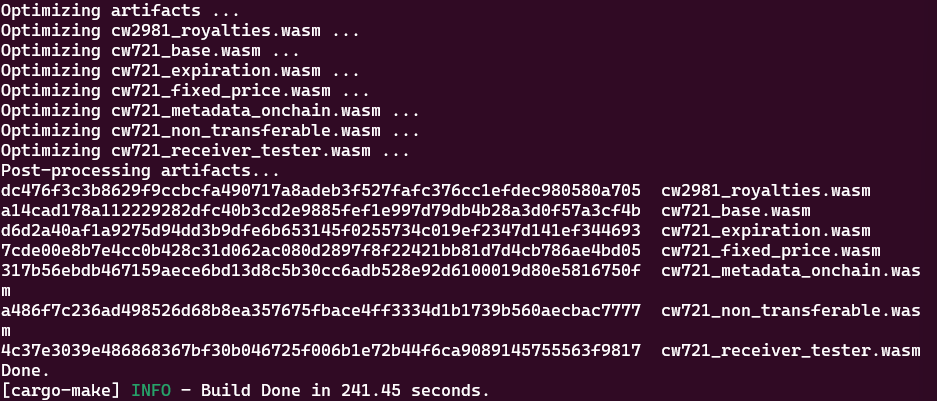
Optimizer를 이용한 빌드 결과 파일들은 ./target 디렉토리에 생성되지 않고, ./artifacts 디렉토리에 생성된다.
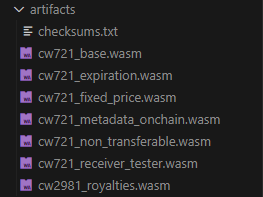
cargo make build를 사용하면 ./target 디렉토리에 생성되는데, 파일 사이즈는 꽤 비교가 된다.
cargo make optimize

cargo make build

(cw721_base.wasm이 일반 build 시 더 작은데 이유를 찾아봐야겠다.)
배포
Wasmd를 설치하고 동작시킨다. 여기서는 Wasmd의 초기화부터 start 까지는 생략한다. Wasmd는 v0.55.0 버전을 사용한다.
해당 버전의 Wasmd의 wasmd tx wasm을 확인해보면 아래와 같다. 이번 글에서는 모두 사용하지는 않고 기본적인 배포 및 실행방법만 확인한다.

CosmWasm 컨트랙트 배포는 크게 두 단계로 나뉜다. store를 통해 wasm 파일을 체인에 등록하고, instantiate를 통해 wasm 컨트랙트에 대한 인스턴스화를 수행한다.
Store
cw721_metadata_onchain.wasm 파일을 블록체인에 등록한다. 그전에, 현재 Wasmd에서 기본적으로 설정된 최대 wasm파일 등록 가능 사이즈는 800 * 1024 bytes이다. 이는 Wasmd의 /x/wasm/types/validation.go에서 확인 가능하다.
그러나 배포할 cw721_metadata_onchain.wasm이 설정된 최대 바이트보다 더 커서 임의로 1000 * 1024로 변경했다. 변경된 설정은 아래와 같다. (기존 MaxWasmSize는 800 * 1024)
// /x/wasm/types/validation.go

// MaxSaltSize is the longest salt that can be used when instantiating a contract
const MaxSaltSize = 64

var (
    // MaxLabelSize is the longest label that can be used when instantiating a contract
    MaxLabelSize = 128 // extension point for chains to customize via compile flag.

    // MaxWasmSize is the largest a compiled contract code can be when storing code on chain
    MaxWasmSize = 1000 * 1024 // extension point for chains to customize via compile flag.

    // MaxProposalWasmSize is the largest a gov proposal compiled contract code can be when storing code on chain
    MaxProposalWasmSize = 3 * 1024 * 1024 // extension point for chains to customize via compile flag.

    // MaxAddressCount is the maximum number of addresses allowed within a message
    MaxAddressCount = 50
)
store를 위한 명령어는 아래와 같다.
$ wasmd tx wasm store ./artifacts/cw721_metadata_onchain.wasm --from mykey1 --gas 7000000
Genesis account로 생성한 mykey1를 사용해서 배포하고, gas는 크게 설정한다. mykey1의 주소(wasm1496gswq49lm0gn8y3974d9sulewqkyzyuj6syk)는 아래와 같다.

트랜잭션을 전송하면 아래와 같은 결과를 확인할 수 있다.
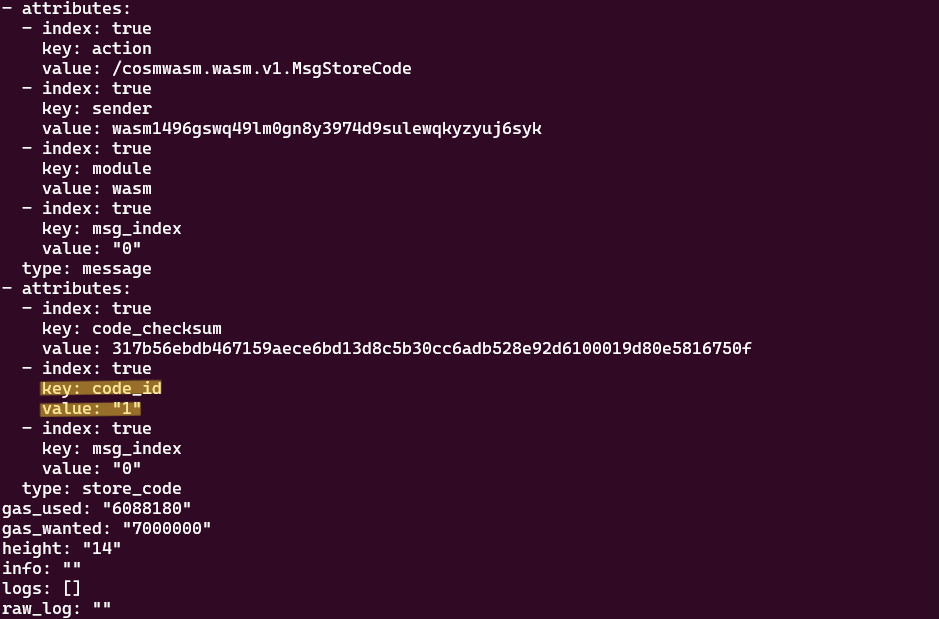
사용된 가스는 6088180이다. 여기서 확인해야 할 사항은 attribute 내의 code_id값이다. code_id는 등록된 wasm 파일 별로 시퀀셜하게 증가하는 값으로, 이 값을 통해 instantiate를 수행하기 때문에 자신이 등록한 wasm 파일의 code_id를 기억해야 한다.
블록체인에 등록된 wasm 파일은 블록체인의 home directory(Wasmd는 ~/.wasmd)에 wasm 파일이 기록되며 컨트랙트가 수행될 때 해당 로컬 파일을 불러와서 실행시킨다. ~/.wasmd/wasm/wasm/state/wasm에 보면 위의 트랜잭션 전송 결과에서 확인 가능한 code_checksum의 값으로 파일이름이 등록된 wasm파일을 확인할 수 있다.

Instantiate
다음은 instantiate이다. Instantiate 시에는 해당 메시지가 어떤 형태인지 확인 해야 한다. 배포한 CW721의 instantiate 메시지 형식은 아래와 같다.
#[cw_serde]
pub struct Cw721InstantiateMsg<TCollectionExtensionMsg> {
    /// Name of the NFT contract
    pub name: String,
    /// Symbol of the NFT contract
    pub symbol: String,
    /// Optional extension of the collection metadata
    pub collection_info_extension: TCollectionExtensionMsg,

    /// The minter is the only one who can create new NFTs.
    /// This is designed for a base NFT that is controlled by an external program
    /// or contract. You will likely replace this with custom logic in custom NFTs
    pub minter: Option<String>,

    /// Sets the creator of collection. The creator is the only one eligible to update `CollectionInfo`.
    pub creator: Option<String>,

    pub withdraw_address: Option<String>,
}
여기서 optional 값은 제외하고 간단하게 배포해 본다.
$ wasmd tx wasm instantiate 1 '{"name":"test_cw721","symbol":"TCW"}' --admin="$(wasmd keys show mykey1 -a)" --from mykey1 --gas 200000 --label "local0.1.0"
Instantiate message는 JSON 형식으로 전송하고, flag 값인 --admin과 --label을 입력한다. --admin은 migration 등 컨트랙트를 매니징할 수 있는 역할을 가진 주소를 등록하는 것이다. 아까 store를 통해 결과로 받은 code ID 1을 기입해야 한다. (... instantiate 1 ...에서의 1)
트랜잭션 전송 결과는 아래와 같다.
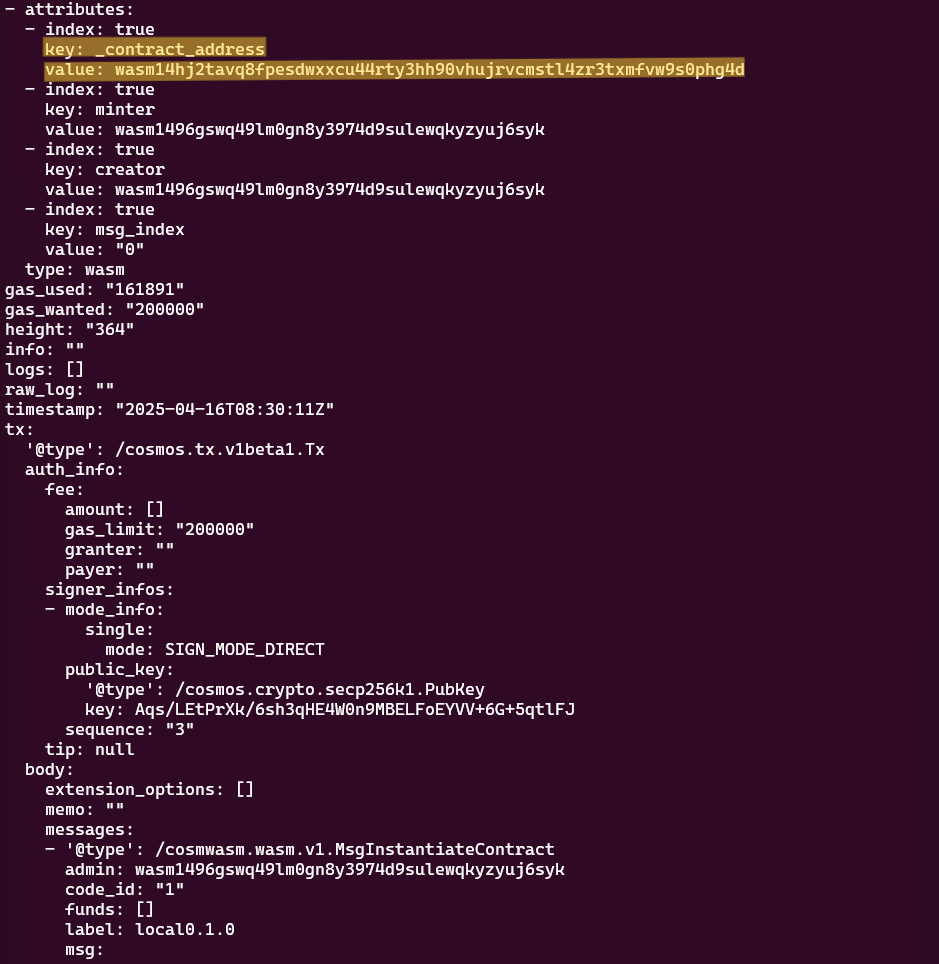
Instantiate 이후 컨트랙트 주소가 생성된다. attribute 내의 _contract_address가 그것이다. (위 그림에서 wasm14hj2tavq8fpesdwxxcu44rty3hh90vhujrvcmstl4zr3txmfvw9s0phg4d이다. 길이가 일반 계정주소와 달리 길어서 쉽게 식별할 수 있다.) Code ID 하나에 instantiate 여러번 수행하여 각각의 컨트랙트 주소를 생성할 수 있다. 이 컨트랙트 주소를 통해 실행시킬 수 있다.
실행
실행을 위한 Execution 트랜잭션 메시지를 전송 할 때는 instantiate와 마찬가지로 메시지 형태를 확인해야 한다. CW721를 수행할 수 있는 메시지와 그 실행 함수는 아래와 같다.
#[cw_serde]
pub enum Cw721ExecuteMsg<
    // NftInfo extension msg for onchain metadata.
    TNftExtensionMsg,
    // CollectionInfo extension msg for onchain collection attributes.
    TCollectionExtensionMsg,
    // Custom extension msg for custom contract logic. Default implementation is a no-op.
    TExtensionMsg,
> {
    #[deprecated(since = "0.19.0", note = "Please use UpdateMinterOwnership instead")]
    /// Deprecated: use UpdateMinterOwnership instead! Will be removed in next release!
    UpdateOwnership(Action),
    UpdateMinterOwnership(Action),
    UpdateCreatorOwnership(Action),

    /// The creator is the only one eligible to update `CollectionInfo`.
    UpdateCollectionInfo {
        collection_info: CollectionInfoMsg<TCollectionExtensionMsg>,
    },
    /// Transfer is a base message to move a token to another account without triggering actions
    TransferNft {
        recipient: String,
        token_id: String,
    },
    /// Send is a base message to transfer a token to a contract and trigger an action
    /// on the receiving contract.
    SendNft {
        contract: String,
        token_id: String,
        msg: Binary,
    },
    /// Allows operator to transfer / send the token from the owner's account.
    /// If expiration is set, then this allowance has a time/height limit
    Approve {
        spender: String,
        token_id: String,
        expires: Option<Expiration>,
    },
    /// Remove previously granted Approval
    Revoke {
        spender: String,
        token_id: String,
    },
    /// Allows operator to transfer / send any token from the owner's account.
    /// If expiration is set, then this allowance has a time/height limit
    ApproveAll {
        operator: String,
        expires: Option<Expiration>,
    },
    /// Remove previously granted ApproveAll permission
    RevokeAll {
        operator: String,
    },

    /// Mint a new NFT, can only be called by the contract minter
    Mint {
        /// Unique ID of the NFT
        token_id: String,
        /// The owner of the newly minter NFT
        owner: String,
        /// Universal resource identifier for this NFT
        /// Should point to a JSON file that conforms to the ERC721
        /// Metadata JSON Schema
        token_uri: Option<String>,
        /// Any custom extension used by this contract
        extension: TNftExtensionMsg,
    },

    /// Burn an NFT the sender has access to
    Burn {
        token_id: String,
    },

    /// Custom msg execution. This is a no-op in default implementation.
    UpdateExtension {
        msg: TExtensionMsg,
    },

    /// The creator is the only one eligible to update NFT's token uri and onchain metadata (`NftInfo.extension`).
    /// NOTE: approvals and owner are not affected by this call, since they belong to the NFT owner.
    UpdateNftInfo {
        token_id: String,
        /// NOTE: Empty string is handled as None
        token_uri: Option<String>,
        extension: TNftExtensionMsg,
    },

    /// Sets address to send withdrawn fees to. Only owner can call this.
    SetWithdrawAddress {
        address: String,
    },
    /// Removes the withdraw address, so fees are sent to the contract. Only owner can call this.
    RemoveWithdrawAddress {},
    /// Withdraw from the contract to the given address. Anyone can call this,
    /// which is okay since withdraw address has been set by owner.
    WithdrawFunds {
        amount: Coin,
    },
}
여기서 Mint로 NFT 하나를 발행한다. cw721_metadata_onchain이기 때문에 NFT 내에 extension을 통해 NFT metadata를 넣을 수 있다. CW721에서 기본적으로 제공되는 metadata 형식은 아래와 같다.
#[cw_serde]
#[derive(Default)]
pub struct NftExtensionMsg {
    /// NOTE: Empty string is handled as None
    pub image: Option<String>,
    pub image_data: Option<String>,
    /// NOTE: Empty string is handled as None
    pub external_url: Option<String>,
    pub description: Option<String>,
    pub name: Option<String>,
    pub attributes: Option<Vec<Trait>>,
    pub background_color: Option<String>,
    /// NOTE: Empty string is handled as None
    pub animation_url: Option<String>,
    /// NOTE: Empty string is handled as None
    pub youtube_url: Option<String>,
}
Mint 트랜잭션 명령은 아래와 같다.
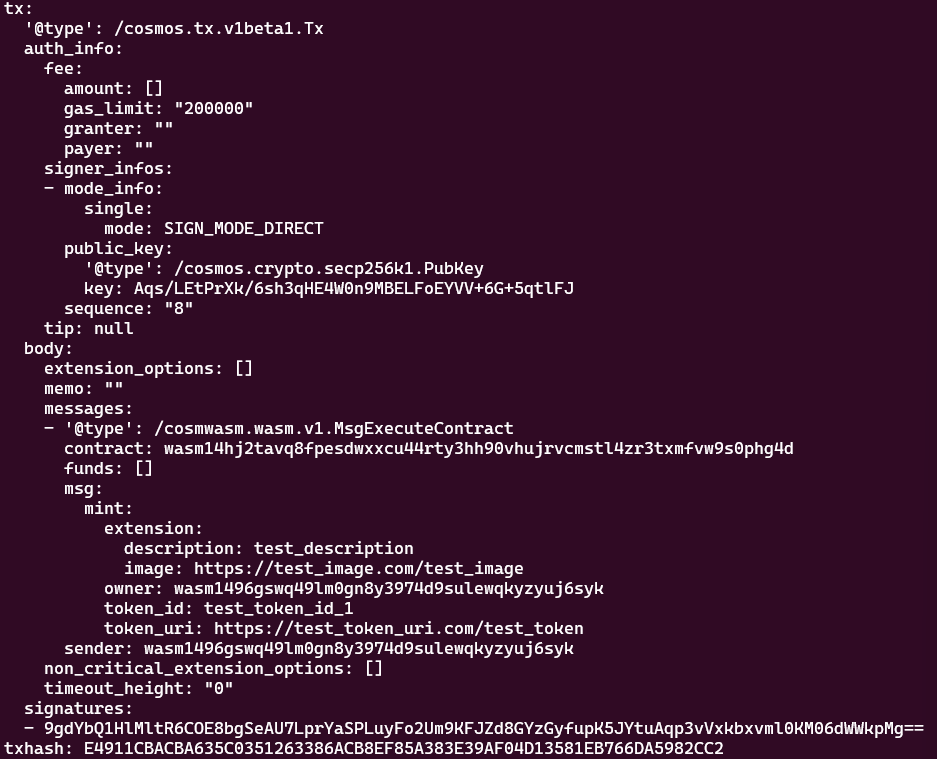
$ wasmd tx wasm execute wasm14hj2tavq8fpesdwxxcu44rty3hh90vhujrvcmstl4zr3txmfvw9s0phg4d '{"mint":{"token_id":"test_token_id_1","owner":"wasm1496gswq49lm0gn8y3974d9sulewqkyzyuj6syk","token_uri":"https://test_token_uri.com/test_token","extension":{"image":"https://test_image.com/test_image","description":"test_description"}}}' --from mykey1 --gas 200000
Instantiate를 통해 생성한 컨트랙트 주소를 입력하고 Mint 메시지 형식에 맞게 트랜잭션을 전송하면 된다. 보기 쉽게 json pretty 한 결과는 아래와 같다.
{
   "mint":{
      "token_id":"test_token_id_1",
      "owner":"wasm1496gswq49lm0gn8y3974d9sulewqkyzyuj6syk",
      "token_uri":"https://test_token_uri.com/test_token",
      "extension":{
         "image":"https://test_image.com/test_image",
         "description":"test_description"
      }
   }
}
트랜잭션 전송 결과는 아래와 같다.
조회
조회를 위한 query message는 아래와 같다.
#[cw_serde]
#[derive(QueryResponses)]
pub enum Cw721QueryMsg<
    // Return type of NFT metadata defined in `NftInfo` and `AllNftInfo`.
    TNftExtension,
    // Return type of collection extension defined in `GetCollectionInfo`.
    TCollectionExtension,
    // Custom query msg for custom contract logic. Default implementation returns an empty binary.
    TExtensionQueryMsg,
> {
    /// Return the owner of the given token, error if token does not exist
    #[returns(OwnerOfResponse)]
    OwnerOf {
        token_id: String,
        /// unset or false will filter out expired approvals, you must set to true to see them
        include_expired: Option<bool>,
    },
    /// Return operator that can access all of the owner's tokens.
    #[returns(ApprovalResponse)]
    Approval {
        token_id: String,
        spender: String,
        include_expired: Option<bool>,
    },
    /// Return approvals that a token has
    #[returns(ApprovalsResponse)]
    Approvals {
        token_id: String,
        include_expired: Option<bool>,
    },
    /// Return approval of a given operator for all tokens of an owner, error if not set
    #[returns(OperatorResponse)]
    Operator {
        owner: String,
        operator: String,
        include_expired: Option<bool>,
    },
    /// List all operators that can access all of the owner's tokens
    #[returns(OperatorsResponse)]
    AllOperators {
        owner: String,
        /// unset or false will filter out expired items, you must set to true to see them
        include_expired: Option<bool>,
        start_after: Option<String>,
        limit: Option<u32>,
    },
    /// Total number of tokens issued
    #[returns(NumTokensResponse)]
    NumTokens {},

    #[deprecated(
        since = "0.19.0",
        note = "Please use GetCollectionInfoAndExtension instead"
    )]
    #[returns(CollectionInfoAndExtensionResponse<TCollectionExtension>)]
    /// Deprecated: use GetCollectionInfoAndExtension instead! Will be removed in next release!
    ContractInfo {},

    /// Returns `AllCollectionInfoResponse`
    #[returns(ConfigResponse<TCollectionExtension>)]
    GetConfig {},

    /// Returns `CollectionInfoAndExtensionResponse`
    #[returns(CollectionInfoAndExtensionResponse<TCollectionExtension>)]
    GetCollectionInfoAndExtension {},

    /// returns `AllInfoResponse` which contains contract, collection and nft details
    #[returns(AllInfoResponse)]
    GetAllInfo {},

    /// Returns `CollectionExtensionAttributes`
    #[returns(CollectionExtensionAttributes)]
    GetCollectionExtensionAttributes {},

    #[deprecated(since = "0.19.0", note = "Please use GetMinterOwnership instead")]
    #[returns(Ownership<Addr>)]
    /// Deprecated: use GetMinterOwnership instead! Will be removed in next release!
    Ownership {},

    /// Return the minter
    #[deprecated(since = "0.19.0", note = "Please use GetMinterOwnership instead")]
    #[returns(MinterResponse)]
    /// Deprecated: use GetMinterOwnership instead! Will be removed in next release!
    Minter {},

    #[returns(Ownership<Addr>)]
    GetMinterOwnership {},

    #[returns(Ownership<Addr>)]
    GetCreatorOwnership {},

    /// With MetaData Extension.
    /// Returns metadata about one particular token, based on *ERC721 Metadata JSON Schema*
    /// but directly from the contract
    #[returns(NftInfoResponse<TNftExtension>)]
    NftInfo { token_id: String },

    #[returns(Option<NftInfoResponse<TNftExtension>>)]
    GetNftByExtension {
        extension: TNftExtension,
        start_after: Option<String>,
        limit: Option<u32>,
    },

    /// With MetaData Extension.
    /// Returns the result of both `NftInfo` and `OwnerOf` as one query as an optimization
    /// for clients
    #[returns(AllNftInfoResponse<TNftExtension>)]
    AllNftInfo {
        token_id: String,
        /// unset or false will filter out expired approvals, you must set to true to see them
        include_expired: Option<bool>,
    },

    /// With Enumerable extension.
    /// Returns all tokens owned by the given address, [] if unset.
    #[returns(TokensResponse)]
    Tokens {
        owner: String,
        start_after: Option<String>,
        limit: Option<u32>,
    },
    /// With Enumerable extension.
    /// Requires pagination. Lists all token_ids controlled by the contract.
    #[returns(TokensResponse)]
    AllTokens {
        start_after: Option<String>,
        limit: Option<u32>,
    },

    /// Custom msg query. Default implementation returns an empty binary.
    #[returns(())]
    Extension { msg: TExtensionQueryMsg },

    #[returns(())]
    GetCollectionExtension { msg: TCollectionExtension },

    #[returns(Option<String>)]
    GetWithdrawAddress {},
}
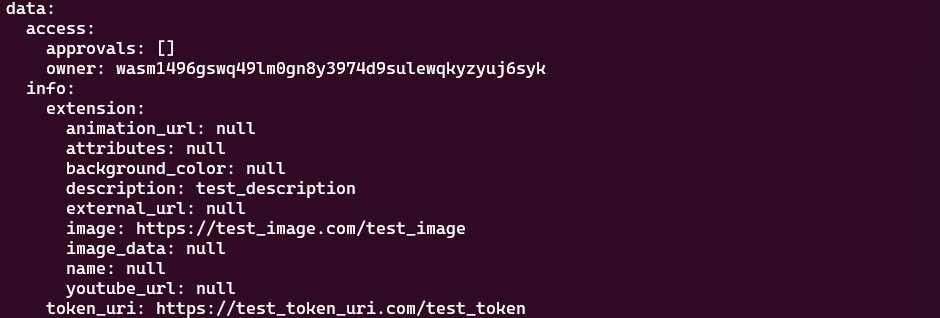
여기서 아까 발행한 NFT 하나를 조회해본다. AllNftInfo는 해당 NFT에 대한 정보를 모두 보여주는 메시지이다.
$ wasmd query wasm contract-state smart wasm14hj2tavq8fpesdwxxcu44rty3hh90vhujrvcmstl4zr3txmfvw9s0phg4d '{"all_nft_info":{"token_id":"test_token_id_1"}}'
조회 결과는 아래와 같다. Execution을 통한 mint 시에 입력한 값과 동일한 값이 출력되는 것을 확인할 수 있다.
Conclusion
CosmWasm CW721를 통해 배포/실행/조회에 대한 전반적인 시퀀스를 CLI를 이용하여 확인해 보았다. Wasm 모듈이 탑재되어 있는 Cosmos-SDK 체인들은 모두 같은 CLI를 이용하니 숙지해 두면 컨트랙트 개발 시 편리할 것이다.
'Blockchain > Smart contract' 카테고리의 다른 글
| ERC20의 기본 동작 (1) | 2025.08.14 |
|---|---|
| IBC를 통한 외부 CosmWasm 실행하기 (1) | 2025.04.21 |
| Golang을 이용하여 Solidity smart contract 다루기 (2) | 2024.11.13 |
| CosmWasm 컨트랙트 개발 시 전략과 신경 쓰면 좋은 점 (1) | 2023.11.01 |
| Remix로 Solidity contract 만들고 배포하기 (0) | 2023.07.11 |